
What is phishing? Phishing is a cyber scam where criminals pretend to be a trusted person, company, bank, delivery service, government agency, school, or workplace tool so they can trick you into sharing sensitive information or clicking a harmful link. According to official FTC phishing guidance, phishing messages often look like they come from organizations you know and may try to get passwords, account numbers, or other personal details. The safest response is simple: pause, verify the sender through a separate official channel, avoid suspicious links or attachments, and report phishing scams when needed.
For everyday users, phishing is not just a “tech problem.” It can affect email accounts, bank logins, cloud files, school portals, work accounts, social media profiles, and even family devices. The goal of this guide is to explain phishing in plain English, show realistic phishing email examples, and give practical steps for how to avoid phishing without making cybersecurity feel complicated.
Cybersecurity Disclaimer
This article is for educational purposes only. It is not legal advice, professional cybersecurity consulting, identity-theft recovery advice, or financial advice. If you believe money was stolen, business systems were compromised, or sensitive data was exposed, contact the affected organization, your financial institution, and the appropriate official reporting channels immediately.
- 1. What Is Phishing?
- 2. How Phishing Works
- 3. Common Types of Phishing Scams
- 4. Phishing Email Examples
- 5. Red Flags of a Phishing Message
- 6. Phishing vs Spam vs Scam
- 7. Why Outlook, OneDrive, and Microsoft 365 Users Are Targeted
- 8. How to Avoid Phishing
- 9. What to Do If You Clicked a Phishing Link
- 10. How to Report Phishing Scams
- 11. Safety Tips for Families and Students
- 12. Business and Work Account Safety
- 13. Beginner Checklist
- Source List –
- Conclusion
- FAQ –
1. What Is Phishing?
Phishing is a form of social engineering. Instead of breaking into your account by force, the attacker tries to make you help them by mistake. A phishing message may say your account will close, your package is delayed, your payment failed, your document is waiting, your bank noticed fraud, or your boss needs an urgent transfer. The message is designed to create pressure so you react before you think.
The CISA phishing guide explains phishing as a criminal attempt to get people to open harmful links, emails, or attachments that can ask for personal information or infect devices. That definition matters because phishing is not limited to email. It can happen through text messages, social media messages, fake login pages, QR codes, phone calls, collaboration tools, and cloud-sharing invitations.
A useful way to remember it: phishing is trust abuse. The scammer borrows the look, language, timing, or brand identity of something familiar, then uses that familiarity to push you into an unsafe action. That action could be entering your password, approving a sign-in request, downloading a file, sending money, or giving away a verification code.
2. How Phishing Works
Most phishing attacks follow a simple pattern: bait, pressure, action, and theft. The bait is the message. The pressure is the reason you feel rushed. The action is what the scammer wants you to do. The theft happens when your information, money, files, or account access is captured.
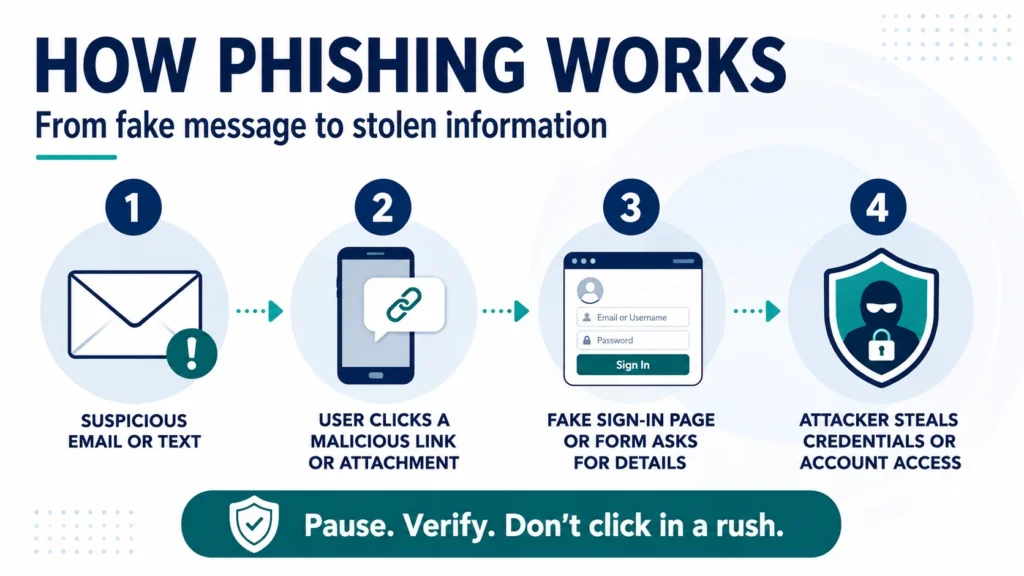
For example, you might receive an email that claims to be from a bank. It says there was suspicious activity and tells you to “verify now.” The link opens a fake page that looks like the bank website. If you enter your username, password, or one-time code, the attacker may use it to access the real account. In other cases, the link may install malware, or the attachment may contain a dangerous file.
Modern phishing scams can be more polished than old scam emails. Some use correct logos, realistic grammar, real names, stolen email threads, cloud-document language, or AI-generated text. That is why the safest habit is not to judge only by appearance. Judge the request. Ask: Was I expecting this? Is the link necessary? Can I verify it another way?
3. Common Types of Phishing Scams
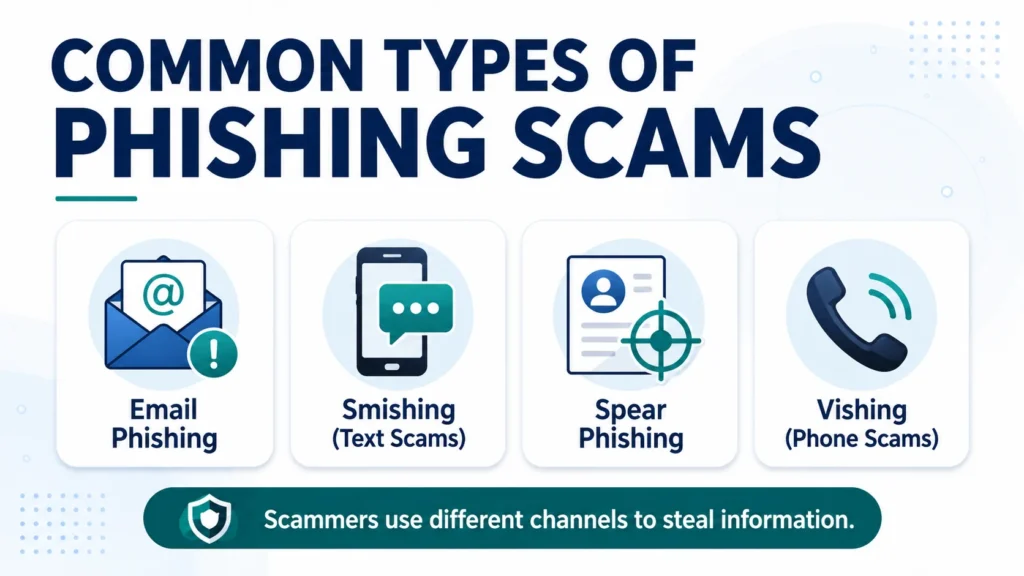
Phishing scams come in several forms. The basic goal is usually the same, but the delivery method changes. Knowing the most common types helps you recognize the trick before you respond.
| Type | How It Works | Common Warning Sign |
| Email phishing | A fake email tries to get a click, login, payment, or download. | Urgent subject line, suspicious link, or unexpected attachment. |
| Smishing | A phishing message sent by text/SMS. | Package, bank, or toll-payment alert with a short link. |
| Vishing | A scam phone call that pressures you to share information. | Caller demands codes, passwords, gift cards, or remote access. |
| Spear phishing | A targeted message uses your name, workplace, school, or role. | Looks personal but asks for unusual action. |
| Business email compromise | An attacker impersonates an executive, vendor, or partner. | Urgent payment, invoice, payroll, or bank-detail change request. |
| Cloud-document phishing | A fake file-share or login prompt targets Microsoft, Google, or other accounts. | Unexpected document link or device-code request. |
The FBI business email compromise page is especially useful for organizations because business email compromise can involve payment instructions, vendor impersonation, and financial loss. For everyday readers, the lesson is still practical: if a message asks for money, login details, or account changes, slow down and verify outside the message.
4. Phishing Email Examples
Good phishing email examples teach you what to watch for without copying a scam too closely. A common example is an account-warning email that says your account will be locked unless you sign in within 24 hours. Another is a delivery message claiming a package cannot be delivered until you pay a small fee. A third is a document-sharing email saying someone shared a file with you, but the link leads to a fake login page.
When people search what is phishing, they often want examples they can compare with messages in their own inbox. A realistic example is a fake invoice that says your payment is overdue and includes a PDF attachment. Another is a fake school portal alert that says your student account will be disabled. Another is a fake cloud storage notice that says your files were shared with an outside user. The exact story changes, but the pattern is the same: the message creates concern and then offers a quick link as the solution.
For US readers, phishing email examples are especially common around tax season, online shopping periods, travel bookings, college admissions, bank alerts, health insurance notices, and job applications. Scammers follow normal life events because those messages feel believable. A fake tax message may ask for identity information. A fake job message may ask for direct-deposit details. A fake delivery message may ask for a small redelivery fee, which can turn into card theft.
Here are simple examples of phishing-style messages you might see:
- Account alert: “Your account has been suspended. Verify your identity immediately.”
- Package alert: “Your delivery is on hold. Pay the redelivery fee now.”
- Cloud file alert: “A secure document has been shared with you. Sign in to view.”
- Payment alert: “Your subscription failed. Update billing details within one hour.”
- Workplace alert: “Your mailbox storage is full. Log in to avoid losing email access.”
Not every alert is fake, but a real alert should still be verified safely. Instead of clicking the message link, open a new browser tab and go to the official website or app yourself. Microsoft phishing protection guidance recommends using official contact methods or saved favorites when a suspicious message appears to come from an organization you know.
- Why Is Roland Garros So Hard to Win? Full Guide
- Protect Outlook OneDrive from Phishing: 9 Smart Safety Steps
- Clicked Phishing Link What to Do: 10 Recovery Steps
- How to Spot Phishing Emails: Red Flags & Examples
- FBI Alert Outlook OneDrive: Phishing Scam Explained
5. Red Flags of a Phishing Message
The biggest red flag is pressure. Phishing messages often try to make you afraid, excited, curious, or rushed. They may threaten account closure, claim suspicious activity, offer a refund, promise a prize, or say a payment failed. The emotion is part of the trap.
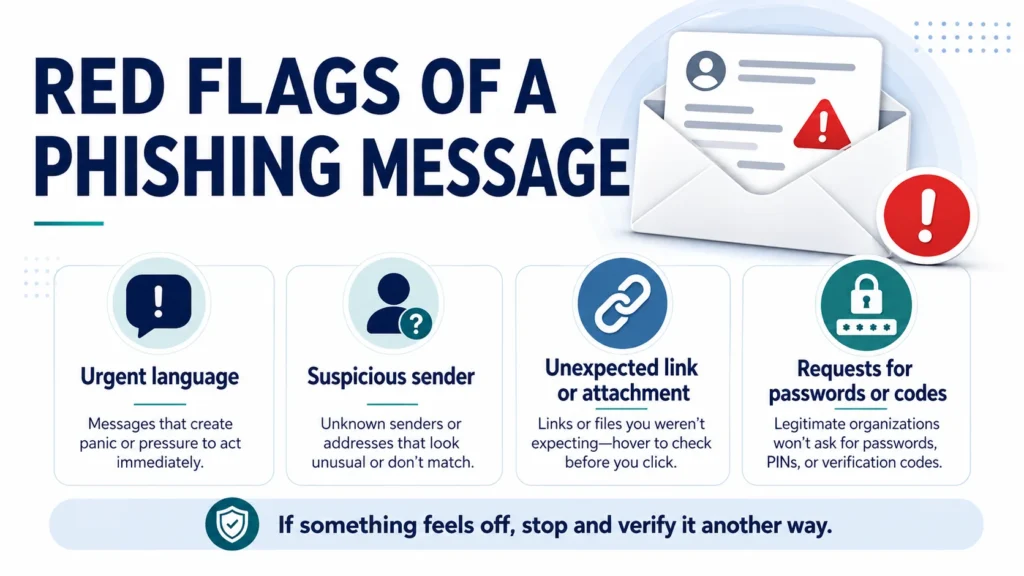
If you are still asking what is phishing while reviewing a message, look for the combination of impersonation plus action. A normal message may inform you about something. A phishing message usually wants you to do something quickly: log in, pay, download, scan, reply, call, approve, or share a code. That action-focused pressure is often more important than spelling mistakes or design quality.
Watch for sender addresses that almost match a real brand but have small changes. Also check for strange attachments, shortened links, mismatched URLs, grammar that feels unusual for the sender, and messages that ask for passwords, Social Security numbers, bank details, gift cards, or security codes. A real company should not ask you to send sensitive login information by email.
Another red flag is a request that breaks normal process. If your school, workplace, bank, or vendor usually communicates through a portal, but suddenly sends a direct login link, verify first. If a boss or colleague asks for an urgent payment, use a phone number or communication method you already trust, not the number inside the suspicious email.
6. Phishing vs Spam vs Scam
People often use the words phishing, spam, and scam together, but they are not exactly the same. Spam is usually unwanted bulk messaging. A scam is a broader trick designed to steal money, information, or access. Phishing is a specific type of scam that uses impersonation and digital messages to push you into revealing information, clicking a harmful link, downloading malware, or approving account access.
| Term | Simple Meaning | Example |
| Spam | Unwanted bulk messages, often promotional. | Random marketing email you did not ask for. |
| Scam | A dishonest scheme to steal money, data, or access. | Fake prize, romance fraud, or tech support fraud. |
| Phishing | A scam using impersonation to steal information or access. | Fake bank login email or fake cloud-file link. |
The distinction helps because the response may be different. You can unsubscribe from legitimate marketing spam. You should delete and report phishing. If money or identity information was stolen, you may need to contact a bank, change passwords, freeze cards, or file reports with official agencies.
7. Why Outlook, OneDrive, and Microsoft 365 Users Are Targeted
Attackers target email and cloud accounts because those accounts often connect to many other parts of a person’s digital life. A compromised mailbox can reveal password resets, invoices, tax forms, school documents, private photos, business files, contacts, and calendar details. A compromised cloud account can expose shared files and workplace data.
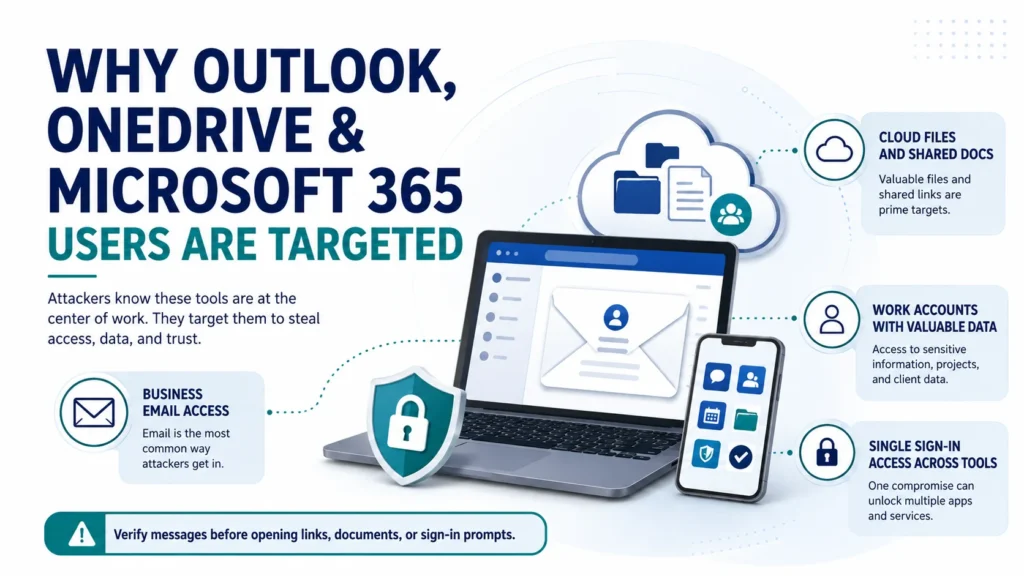
The FBI’s 2026 Kali365 public service announcement warned about a phishing-as-a-service platform that can target Microsoft 365 access tokens and affect environments connected to Outlook, Teams, and OneDrive. The important takeaway for readers is not to panic. The takeaway is to understand that phishing is evolving beyond simple password theft. Some attacks try to trick users into authorizing access, entering device codes, or approving prompts they do not fully understand.
If you use Outlook, OneDrive, Teams, or another cloud account, treat unexpected document shares, verification codes, and sign-in prompts carefully. The Microsoft Outlook suspicious behavior guidance also notes that Outlook may mark suspicious senders or messages, but users should still review unexpected messages with care. Security tools help, but human verification is still important.
8. How to Avoid Phishing
The best way to learn how to avoid phishing is to build a short pause into your routine. When a message asks for urgent action, stop for a few seconds. Read the sender, the request, the link destination, and the context. If something feels off, do not click first. Verify first.
A strong anti-phishing habit is to separate notification from action. You can read a message, but you do not have to use its link. If your bank says there is a problem, open the bank app yourself. If your email says storage is full, go directly to your account settings. If a delivery company says a package is delayed, use the tracking number from your original order. This simple separation removes much of the scammer’s power.
Use strong, unique passwords and a password manager when possible. Reused passwords make phishing damage worse because one stolen password can unlock several accounts. Turn on multifactor authentication, especially for email, bank, cloud, school, and work accounts. CISA multifactor authentication guidance explains that MFA adds another method of verifying your identity and makes unauthorized access harder.
Keep your phone, browser, computer, and security software updated. The CISA Secure Our World campaign emphasizes practical steps like strong passwords, MFA, updates, and recognizing phishing. These steps are not perfect, but together they reduce risk. Cybersecurity is strongest when small habits work together.
For suspicious links, do not rely on a quick glance. Hovering can help on desktop, but shortened links and mobile screens can hide the real destination. The safer choice is to type the website yourself, use the official app, or search for the organization directly. If a message claims to be from a company, use the company’s official website, not the message link.
9. What to Do If You Clicked a Phishing Link
Clicking a phishing link does not always mean disaster, but you should act quickly. First, do not enter any more information. If you typed a password, change that password from the real website or app, not from the suspicious page. If you reuse that password anywhere else, change those accounts too. Prioritize email, banking, social media, and cloud storage.
If you downloaded a file or opened an attachment, disconnect from the internet if you suspect malware, run a security scan, and avoid logging into important accounts from that device until you feel confident it is clean. If this happened on a work or school device, report it to IT immediately. Fast reporting helps limit damage.
If you gave payment information, contact the bank or card issuer quickly. If you shared Social Security numbers, identity documents, or tax information, consider identity-theft protection steps. If your account was accessed, sign out of all sessions when possible, revoke suspicious app permissions, reset passwords, and review account recovery details.
10. How to Report Phishing Scams
Learning how to report phishing scams helps protect you and other people. If the message came to a work or school account, report it through the internal security or IT channel first. If it came to a personal account, use the report phishing button if your email provider offers one.
The FTC says suspicious phishing attempts can be reported through ReportFraud.ftc.gov. For cyber-enabled crime, fraud, or business email compromise, the FBI’s Internet Crime Complaint Center is the main place to file a report. You can report even if you are unsure whether the incident fully qualifies, because reports help law enforcement identify patterns.
Before deleting the message, save useful details if you need them: sender address, date, subject line, screenshots, links, phone numbers, payment instructions, and any account activity. Do not forward malicious attachments to friends or coworkers. When in doubt, ask your email provider, school, workplace IT team, or official agency guidance for the safest reporting method.
11. Safety Tips for Families and Students
Phishing can affect children, college students, parents, and older adults in different ways. Students may receive fake scholarship, school portal, internship, or package messages. Parents may see fake school-payment notices or child-safety alerts. Older family members may be pressured by fake bank warnings, government impersonators, or tech support scams.
Families can reduce risk by creating simple rules. Do not share passwords. Do not send verification codes to anyone. Do not install apps because a stranger asks. Do not pay with gift cards for emergencies. If a message creates fear, call someone you trust before acting. These rules are simple enough for everyday use and strong enough to stop many common phishing scams.
It also helps to practice with examples. Show family members a safe screenshot of a fake login email, a package text, and an urgent bank message. Ask them to spot the pressure words, link, sender, and request. The goal is not to scare people. The goal is to make the pause-and-verify habit feel normal.
12. Business and Work Account Safety
At work, phishing can be more damaging because one compromised account may expose customer data, invoices, payroll systems, shared drives, or internal documents. Employees should be trained to report suspicious messages without fear. A culture that punishes mistakes can make people hide them, while a quick-report culture can reduce damage.
Organizations should combine user training with technical controls. Email filtering, domain authentication, least-privilege access, strong password policies, MFA, device management, and incident response planning all matter. The NIST phishing guidance notes that phishing is a common cybercrime that uses convincing messages to trick users into harmful actions, which is why training and controls should work together.
For payment or vendor changes, businesses should use out-of-band verification. That means confirming through a trusted phone number or established process, not simply replying to the email. If a message asks to change banking details, rush a wire transfer, or buy gift cards, treat it as high risk until verified.
- Generative AI Uses and Risks: 11 Real-Life Lessons for Beginners
- What is Generative AI? 12 Powerful Basics for Beginners
- What is AI? 11 Powerful Basics Every Beginner Should Know
- AI vs Machine Learning: Powerful 2026 Career Truth
- Types of Yoga: 30 Powerful Styles Explained
13. Beginner Checklist
Use this simple checklist before you click, download, reply, or pay:
- Pause first: Is the message trying to rush or scare you?
- Check the sender: Does the email address, phone number, or profile truly match?
- Avoid message links: Go to the official website or app yourself.
- Do not share codes: Never send login codes or MFA prompts to someone else.
- Use unique passwords: A password manager can make this easier.
- Turn on MFA: Use app-based or phishing-resistant options when available.
- Report suspicious messages: Use your provider, workplace, FTC, or FBI IC3 reporting route.
- Ask for help: If money, identity documents, or work data are involved, escalate quickly.
A simple rule can prevent many mistakes: If the message gives you pressure plus a link, verify before you click. This rule works for email, text messages, social media, cloud documents, QR codes, and workplace chat tools.
Source List –
Conclusion
So, what is phishing? Phishing is a digital impersonation scam that tries to turn trust, urgency, and confusion into stolen information, stolen money, malware infection, or account takeover. It can appear as a fake email, text, phone call, cloud-document invite, login page, QR code, or workplace request.
A beginner-friendly answer to what is phishing should always include two parts: the fake identity and the unsafe request. The fake identity could be a bank, brand, school, employer, delivery service, software company, friend, or government agency. The unsafe request could be a login, download, payment, code, or approval. Once you understand those two pieces, phishing becomes easier to spot across many platforms.
The safest strategy is not to memorize every scam. Scams change too quickly. Instead, learn the pattern: unexpected message, emotional pressure, suspicious link or attachment, request for sensitive information, and a demand for fast action. When that pattern appears, pause and verify through a trusted channel.
For InfoJustify readers, the best next step is to make phishing safety part of normal internet use. Use unique passwords, turn on MFA, update devices, avoid suspicious links, verify urgent requests, and report phishing scams when needed. These habits will not make you invincible, but they can make you much harder to trick.
FAQ –
1. What is phishing in simple words?
Phishing is a scam where someone pretends to be a trusted person or organization to trick you into clicking a harmful link, downloading a dangerous file, sharing personal information, or giving access to an account. In simple terms, what is phishing means a fake message trying to make you take an unsafe action.
2. What are common phishing email examples?
Common phishing email examples include fake bank alerts, package delivery problems, cloud-document shares, password reset warnings, payment failure notices, fake invoices, and urgent workplace requests.
3. How do I know if an email is phishing?
Look for urgency, suspicious links, unexpected attachments, misspelled sender addresses, requests for passwords or codes, unusual payment instructions, and messages that do not match your normal relationship with the sender.
4. How can I avoid phishing?
You can avoid phishing by pausing before you click, going directly to official websites, using unique passwords, turning on multifactor authentication, updating devices, and verifying urgent requests through a separate trusted channel.
5. What should I do if I clicked a phishing link?
Stop entering information, change any password you submitted, enable or review MFA, scan your device if a file was downloaded, contact your bank if payment data was shared, and report the incident through the proper channel.
6. Where can I report phishing scams?
You can report phishing scams to your email provider, your workplace or school IT team, the FTC at ReportFraud.ftc.gov, and the FBI Internet Crime Complaint Center at IC3.gov if cybercrime or fraud is involved.
- Protect Outlook OneDrive from Phishing: 9 Smart Safety Steps
- Clicked Phishing Link What to Do: 10 Recovery Steps
- How to Spot Phishing Emails: Red Flags & Examples
- FBI Alert Outlook OneDrive: Phishing Scam Explained
- What Is Phishing? Meaning, Examples & Safety Tips
- How to Improve Your Credit Score in the USA: Complete Guide
- Why Is Roland Garros So Hard to Win? Full Guide
- Roland Garros Winners List: Champions, Records & Legends
- Why Is Roland Garros Played on Clay? Court Guide
- French Open vs Roland Garros: Are They the Same Tournament?
- Roland Garros Meaning, History & Clay Court Explained
- Guzman y Gomez vs Chipotle: Menu, Taste, and Value Compared
- Chipotle Bowl vs Burrito: Which One Is Healthier?
- Chipotle Nutrition Guide: Calories, Protein & Smart Orders
- Healthiest Thing to Eat at Chipotle: Best Orders Explained
- Chipotle Mexican Grill Menu Explained: Best Items to Try
- Social Security Payment Schedule 2026: Dates by Birth Date
- Social Security COLA 2026 Explained: What Changed This Year
- Kyle Busch Pneumonia Sepsis: Cause of Death Explained
- Why Are Social Security Checks Late in May 2026? (The Real Truth)
- Antarctica From Space: 5 Climate Signals to Watch
- Ebola Outbreak 2026: Bundibugyo Virus Explained & Related Topic
- Robert Redfield: Biography, CDC Role, COVID-19 Legacy
- Types of Yoga: 30 Powerful Styles Explained
- What is Cloud Storage ? 7 Best Basics
2 thoughts on “What Is Phishing? Meaning, Examples & Safety Tips”