
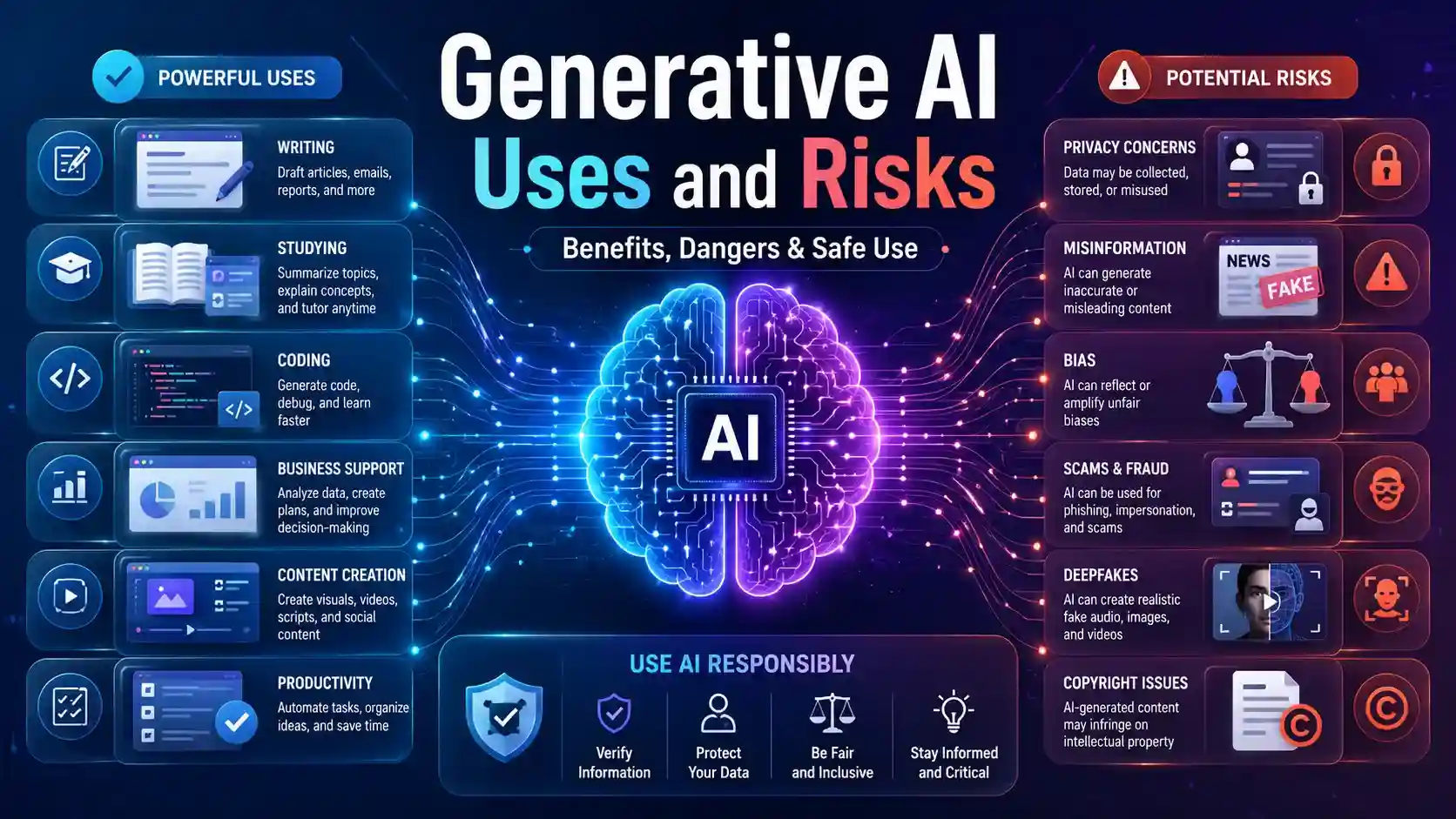
Generative AI uses and risks are important to understand because this technology is now part of writing, learning, business, design, coding, and daily productivity. It can help people save time and create faster, but it can also create wrong information, privacy problems, bias, fake content, scams, and copyright confusion.
Generative AI is a type of artificial intelligence that can create original content such as text, images, video, audio, or software code in response to a user’s prompt or request. IBM explains generative AI in this way, which makes it easier for beginners to understand what this technology actually does.
The simple rule is this: generative AI can help you start, but it should not think for you. Use it as a helpful assistant, then review, edit, fact-check, and improve the final output before you trust it or publish it.
- What Are Generative AI Uses and Risks?
- Why This Topic Matters Today
- Common Generative AI Uses in Daily Life
- Generative AI Benefits for Beginners
- Generative AI Benefits for Beginners
- Generative AI Risks You Should Not Ignore
- How to Use Generative AI Safely
- Right Way vs Wrong Way to Use Generative AI
- Try the HTML Template Visual Editor
- Who Can Benefit from Generative AI?
- A Simple Human-Friendly Example
- Conclusion: Generative AI Uses and Risks
- FAQs About Generative AI Uses and Risks
What Are Generative AI Uses and Risks?
Generative AI uses and risks simply means two things: how people can use generative AI in helpful ways, and what problems may happen if they use it carelessly. The helpful side includes writing support, study help, coding assistance, business communication, content planning, image ideas, and productivity.
The risk side is just as important. Generative AI can create answers that sound correct but are actually wrong. It may also create biased results, expose private information, help scammers create fake content, or raise copyright concerns.
A beginner should not look at generative AI as a magic machine. A better way to think about it is simple: AI can create a useful first draft, but the user is responsible for making that draft accurate, safe, original, and valuable.
Why This Topic Matters Today
Generative AI matters because many people are already using it without fully understanding its limits. Students use it to explain difficult lessons. Bloggers use it to plan content. Small business owners use it to write customer replies. Developers use it to understand code.
This can be very useful, especially for beginners. A person who struggles with writing can get a starting draft. A student who feels confused can get a simpler explanation. A small team with limited time can create first versions of emails, captions, or product descriptions.
But easy access also creates risk. If someone copies AI content without checking it, they may publish inaccurate or generic information. If someone shares private data with an AI tool, they may create a security or privacy problem. That is why generative AI benefits and generative AI risks should always be understood together.
Google’s Search Central guidance says content should be helpful, reliable, and created for people first, not mainly to manipulate search rankings. This is especially important when using AI for content because the final article still needs real value, accuracy, and trust.
Common Generative AI Uses in Daily Life
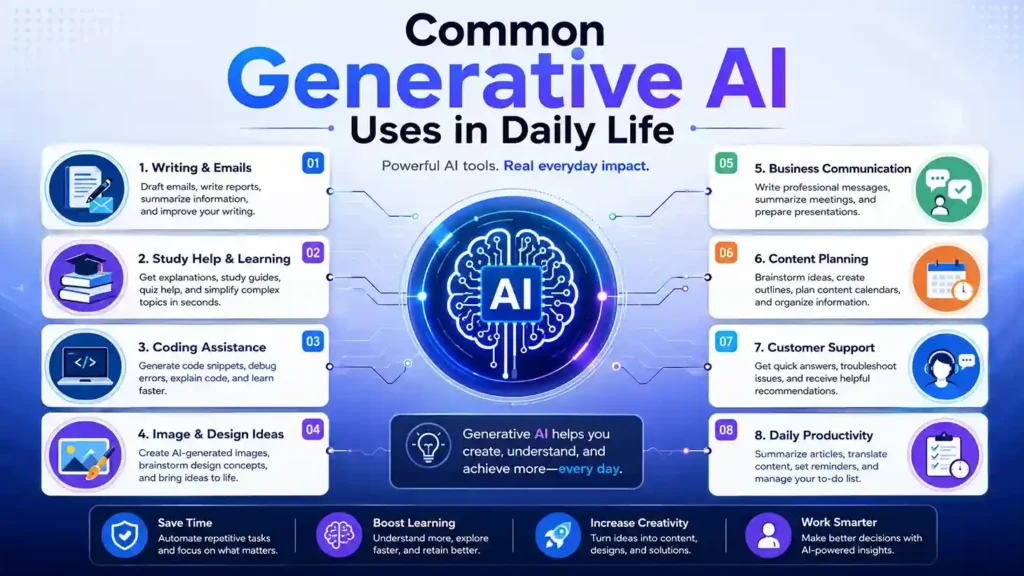
One of the most common generative AI uses is writing support. People use it to draft emails, create blog outlines, write captions, summarize long documents, improve resumes, and prepare product descriptions. It helps users move past the blank page and start faster.
For example, a small business owner may ask generative AI to write a product description for a handmade item. The AI can create a quick draft, but the owner should still add real product details, customer benefits, and brand voice before publishing it.
Students can use generative AI to understand difficult topics in simple language. A student might ask, “Explain inflation like I am in high school,” and the AI can break the topic into easier words. This can support learning, but it should not become a shortcut for copying assignments.
Bloggers and creators can use generative AI for topic ideas, article outlines, FAQ questions, image prompts, and content planning. It can help organize thoughts, but the final content should still include human examples, original explanation, and proper fact-checking.
Developers can use generative AI to understand code, find possible errors, and create simple examples. This is useful for learning, but AI-generated code should always be tested because it may include mistakes, weak logic, or security issues.
Generative AI Benefits for Beginners
The biggest generative AI benefits are speed, structure, and easier learning. Many beginners do not struggle because they lack ideas; they struggle because they do not know where to start. Generative AI can create a draft, outline, summary, or example that makes the first step easier.
For students, it can explain hard topics in simpler language. A learner can ask for examples, step-by-step explanations, or practice questions. This makes learning more comfortable, especially when a textbook or article feels too difficult.
Generative AI Benefits for Beginners
Generative AI can help beginners save time, learn faster, organize ideas, improve writing, and complete simple digital tasks with more confidence. The real benefit comes when users treat AI as a helpful assistant and improve the output with their own thinking.
Saves Time
Creates first drafts, summaries, outlines, and ideas quickly so beginners do not start from a blank page.
Makes Learning Easier
Explains difficult topics in simple words and helps students understand concepts step by step.
Improves Writing
Helps with emails, captions, notes, blog outlines, and better sentence structure for beginners.
Boosts Creativity
Suggests ideas for content, designs, stories, videos, images, and business communication.
Organizes Work
Turns rough notes into checklists, tables, plans, study schedules, or simple workflows.
Supports Skill Building
Helps beginners practice prompts, understand code, improve research habits, and learn digital skills.
Beginner Benefit Impact Chart
How Beginners Can Use Generative AI
| Beginner Need | How Generative AI Helps | Best Safe Use |
|---|---|---|
| Understanding a topic | Explains difficult ideas in simple language | Compare the answer with trusted learning sources |
| Writing faster | Creates first drafts for emails, notes, captions, and outlines | Edit the draft to make it accurate and natural |
| Planning content | Suggests blog sections, FAQs, titles, and content angles | Add original examples and verify facts before publishing |
| Learning code | Explains errors, functions, and basic programming examples | Test all code before using it in a real project |
| Organizing ideas | Turns rough thoughts into tables, checklists, and action plans | Review the output and adjust it to your real goal |
For bloggers and creators, generative AI can help with brainstorming. It can suggest title ideas, content sections, meta description drafts, and image prompts. But the final content should still be improved with research, personal judgment, and fresh value.
For businesses, generative AI can save time on repetitive writing. It can draft emails, meeting summaries, customer replies, FAQ answers, and marketing ideas. Small teams may find this helpful because they often do not have separate writers, designers, and support staff.
The real benefit comes when humans improve the output. AI can make the first version faster, but human editing makes it useful, accurate, natural, and trustworthy.
Generative AI Risks You Should Not Ignore
The first major generative AI risk is accuracy. AI can sometimes create an answer that sounds confident but is wrong, incomplete, or outdated. This problem is often called hallucination, and it becomes serious when the topic involves health, finance, law, education, safety, or current events.
Privacy is another important concern. Users may paste personal, financial, medical, legal, or business information into an AI tool without understanding how that information may be handled. A safe habit is to avoid entering passwords, bank details, Social Security numbers, private medical records, legal documents, personal addresses, or confidential business data.
Bias is also a real risk. AI systems learn from data, and if that data includes unfair patterns, the output may also reflect those patterns. NIST lists trustworthy AI characteristics such as reliability, safety, security, transparency, explainability, privacy, and fairness with harmful bias managed.
Scams and fake content are another serious problem. Generative AI can be misused to create fake reviews, phishing emails, fake voices, fake images, or misleading claims. The FTC has taken action against deceptive AI claims and described concerns around AI-generated false or deceptive content, including fake reviews.
Copyright can also become confusing. AI-generated text, images, audio, or designs may raise questions about originality, ownership, and commercial use. For a website or blog, it is safer to avoid copyrighted logos, celebrity likenesses, protected characters, and brand-style imitation unless you have permission.
How to Use Generative AI Safely
Generative AI can save time and improve productivity, but safe use is important. Follow these simple AI safety tips to protect your privacy, improve accuracy, and use AI responsibly.
Verify Important Facts
Check important AI answers with trusted sources before publishing, paying, applying, or making decisions.
Protect Private Data
Do not share passwords, bank details, Social Security numbers, medical records, or confidential files.
Edit Every Draft
Use AI output as a starting point, then improve it with your own judgment, examples, and natural wording.
Check for Bias
Review AI content carefully when it talks about people, jobs, education, health, finance, or social issues.
Avoid Fake Claims
Do not use generative AI to create misleading reviews, fake images, false news, scams, or deceptive content.
Respect Copyright
Avoid copyrighted logos, celebrity likenesses, protected characters, and brand-style imitation without permission.
Good AI safety tips start with fact-checking. If the AI gives you important information, verify it through official websites, trusted sources, documentation, or expert guidance before using it. This is especially important for health, finance, law, education, and safety topics.
The second rule is to protect private data. Do not paste sensitive personal or business information into an AI tool unless you clearly understand the platform’s privacy terms and trust how it handles data.
The third rule is to edit every draft. AI can create a useful starting point, but it may still sound generic, repetitive, or incomplete. Human editing helps make the final content more accurate, natural, and helpful.
The fourth rule is to check for bias or unfair wording. If the AI output talks about people, jobs, education, health, finance, or social issues, review it carefully so it does not create harmful or unfair conclusions.
The fifth rule is to add original value. If you use AI for blogging, do not publish a plain AI draft. Add examples, structure, personal explanation, trustworthy sources, and helpful details that actually solve the reader’s problem.
For more useful insights
What is Generative AI? 12 Powerful Basics for Beginners
What is AI? 11 Powerful Basics Every Beginner Should Know
Right Way vs Wrong Way to Use Generative AI
The wrong way to use generative AI is to ask for a full article, copy it directly, and publish it without checking facts. This creates thin, generic content and can damage reader trust.
A better way is to use AI for planning and drafting, then improve the content with research, examples, editing, and source verification. This gives you speed without losing quality.
For example, a blogger writing about “AI tools for students” can ask AI for an outline. After that, the blogger should check the tools, explain real use cases, add safety warnings, improve headings, and write a useful conclusion.
This approach also fits better with SEO. Rank Math explains that focus keywords are the words or phrases you want a post to rank for, and Rank Math checks important areas such as SEO title, meta description, URL, first 10% of content, and subheadings. It also warns that excessive keyword use can sound unnatural for readers.
That is why the focus keyword should be placed naturally. The goal is not to repeat the keyword everywhere. The goal is to help Google and readers clearly understand the topic without making the article sound robotic.
Try the HTML Template Visual Editor
Preview, edit, and improve HTML templates visually with the InfoJustify HTML Template Visual Editor. It is useful for bloggers, students, creators, and beginners who want to work with HTML sections more easily.
Who Can Benefit from Generative AI?
Students can benefit when they use generative AI for learning support. It can explain topics, create practice questions, summarize notes, and help improve writing. But students should not use it to cheat or submit copied answers.
Bloggers can benefit when they use AI for brainstorming, outlines, FAQs, image prompts, and content improvement. But the final article should still be original, helpful, and written for real readers.
Small business owners can benefit by using AI to draft product descriptions, email replies, social media posts, FAQ answers, and customer support messages. They should still review every output before using it publicly.
Developers can benefit from code explanations, debugging suggestions, documentation help, and simple examples. But AI-generated code should always be tested before it is used in a real project.
Everyday users can also benefit from AI for planning, summarizing, writing messages, comparing ideas, and organizing tasks. The key is to use AI for support, not blind decision-making.
A Simple Human-Friendly Example
Imagine you want to write a professional email to a client, but you do not know how to start. Generative AI can create a polite first draft in seconds. That is useful.
But if the draft includes wrong dates, wrong names, or an overly formal tone, you still need to fix it. The AI helped you start, but you made it correct and personal.
Now imagine a student asks AI to explain a difficult science topic. The explanation may be easier than a textbook, but the student should still compare it with class notes or trusted learning material.
This is the best way to understand generative AI uses and risks. AI can make tasks easier, but humans still need to guide, check, and improve the result.
Conclusion: Generative AI Uses and Risks
Generative AI uses and risks should always be understood together. Generative AI can help with writing, studying, coding, designing, business communication, content planning, and daily productivity.
At the same time, generative AI risks are real. It can create wrong information, biased answers, privacy issues, fake content, scams, deepfakes, copyright confusion, and overdependence on AI-generated output.
The smart way to use generative AI is simple. Use it as an assistant, give clear prompts, review the output, verify important facts, protect private data, and add your own thinking before publishing or making decisions.
FAQs About Generative AI Uses and Risks
These quick answers explain the most important generative AI uses and risks in simple words, so beginners can understand AI benefits, safety tips, and common concerns before using AI tools.
1. What are generative AI uses and risks?
Generative AI uses include writing, studying, coding, designing, summarizing, and business support. Generative AI risks include wrong information, privacy issues, bias, scams, fake content, deepfakes, and copyright concerns.
2. What are the most common generative AI uses?
The most common generative AI uses include writing emails, creating content drafts, summarizing text, generating image ideas, helping with code, preparing study notes, and planning marketing content.
3. What are the biggest generative AI risks?
The biggest generative AI risks include hallucinations, privacy leaks, biased output, fake content, phishing scams, deepfakes, copyright concerns, and overdependence on AI-generated answers.
4. Is generative AI safe for beginners?
Generative AI can be safe for beginners when used carefully. Users should avoid sharing private data, verify important facts, edit AI-generated content, and use trusted tools.
5. What are the main generative AI benefits?
The main generative AI benefits include faster writing, easier learning, better brainstorming, improved productivity, coding support, and helpful business communication drafts.
6. How can students use generative AI responsibly?
Students can use generative AI to understand topics, create study notes, generate practice questions, and improve writing. They should not copy AI answers as their own work.
7. What are the best AI safety tips?
The best AI safety tips are to verify facts, protect private information, edit every draft, check for bias, avoid fake claims, review copyright concerns, and use AI as an assistant instead of a final authority.
- Are AI voices safe for YouTube monetization
- Realistic Indian Accent AI Voices for Free: 3 Best Tools
- ElevenLabs Free Alternatives for Emotional Voices: 3 Picks
- Best Free AI Voice Generators for Faceless YouTube Shorts
- Top 5 Free AI Voice Generator Realistic Tools
- Free AI Video Generators Without Watermark: 2026 Truth
- AI vs Machine Learning: Powerful 2026 Career Truth
- Generative AI Uses and Risks: 11 Real-Life Lessons for Beginners
- What is Generative AI? 12 Powerful Basics for Beginners
- What is AI? 11 Powerful Basics Every Beginner Should Know
2 thoughts on “Generative AI Uses and Risks: 11 Real-Life Lessons for Beginners”