

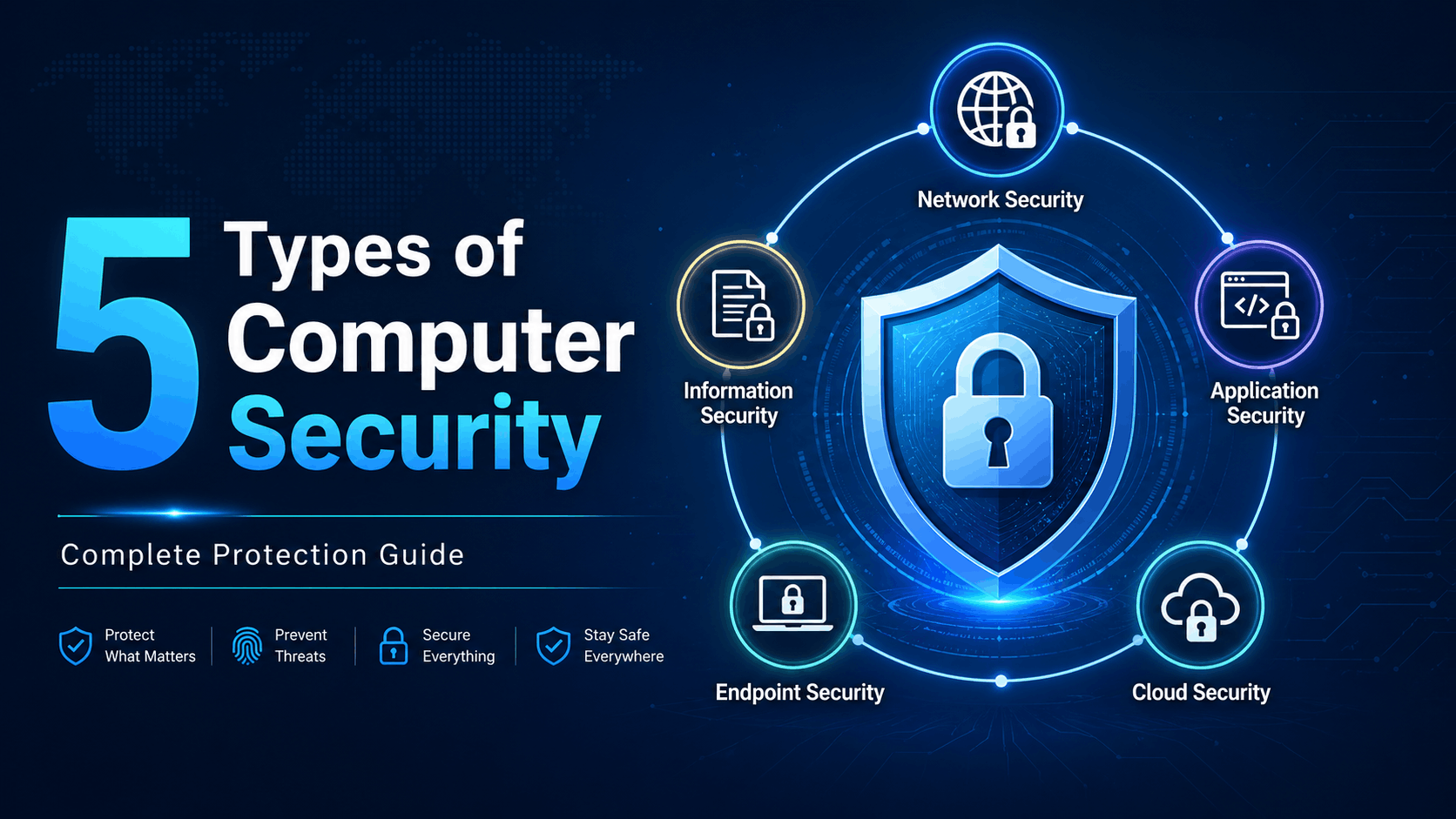
क्या आपका computer सच में secure है? 🔐 सिर्फ antivirus लगाना काफी नहीं—जानिए 5 Types of Computer Security, जो आपके data, password, Wi-Fi, apps और cloud files को hackers से बचाने में मदद करते हैं।
Table of Contents
आज के digital समय में computer security सिर्फ computer experts या companies के लिए जरूरी नहीं है, बल्कि हर उस व्यक्ति के लिए जरूरी है जो mobile, laptop, internet banking, email, social media या online shopping का इस्तेमाल करता है। पहले लोग सोचते थे कि cyber attack सिर्फ बड़ी companies पर होते हैं, लेकिन अब hackers आम users, students, छोटे businesses और bloggers को भी target करते हैं। अगर आपका system secure नहीं है, तो आपका data चोरी हो सकता है, password leak हो सकता है, bank details misuse हो सकती हैं और आपकी personal privacy खतरे में पड़ सकती है।
5 types of computer security को समझना इसलिए जरूरी है क्योंकि computer को secure करने के लिए सिर्फ antivirus काफी नहीं होता। Security एक layered system की तरह होती है। जैसे घर की safety के लिए सिर्फ दरवाजा नहीं, बल्कि lock, CCTV, boundary wall और alarm system भी जरूरी होता है, वैसे ही computer की सुरक्षा के लिए network security, application security, information security, endpoint security और cloud security की जरूरत होती है। ये पाँचों security types मिलकर आपके digital system को अलग-अलग angles से protect करते हैं।
1. Network Security क्या है?
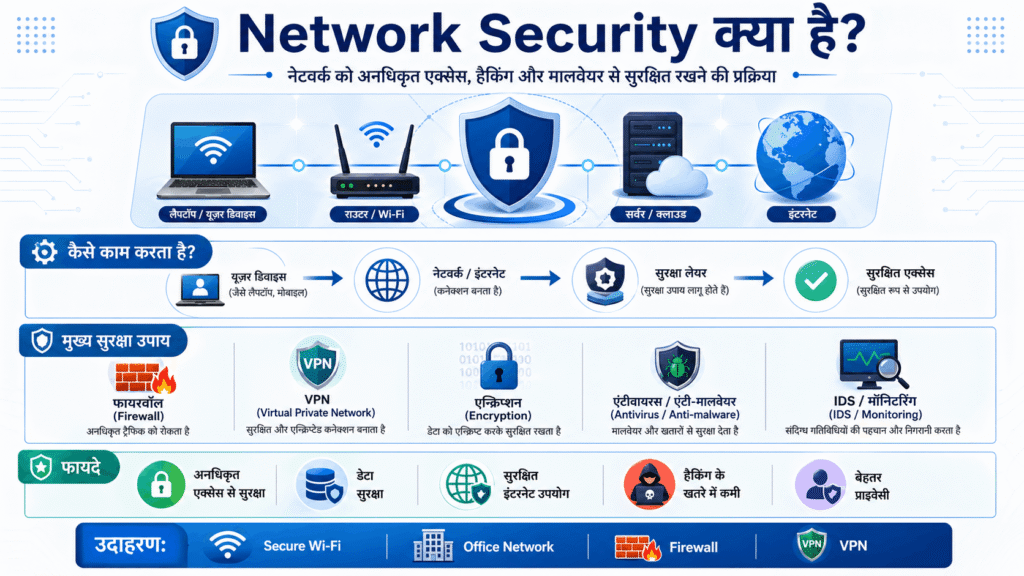
Network Security computer security का बहुत important हिस्सा है, क्योंकि ज्यादातर cyber attacks internet या network के जरिए ही होते हैं। जब आपका computer, mobile या office system किसी Wi-Fi, LAN, router या internet connection से जुड़ता है, तो वह network का हिस्सा बन जाता है। अगर यह network secure नहीं है, तो hacker आपके system में unauthorized access लेने की कोशिश कर सकता है। Network security का मुख्य काम इसी unauthorized access, malware traffic, hacking attempts और data चोरी को रोकना होता है।
Network security को आप एक digital gatekeeper की तरह समझ सकते हैं। जैसे किसी building के बाहर security guard यह check करता है कि कौन अंदर आ सकता है और कौन नहीं, वैसे ही firewall, VPN, IDS और network monitoring tools यह decide करते हैं कि कौन सा traffic safe है और कौन सा dangerous। अगर कोई suspicious request आती है, तो firewall उसे block कर देता है। इसी तरह VPN आपके internet connection को encrypted बना देता है, जिससे public Wi-Fi पर भी आपका data कुछ हद तक safe रहता है।
Network Security के Example
- Firewall protection
- Secure Wi-Fi password
- VPN connection
- Router security
- Intrusion Detection System
- Network monitoring tools
अगर आप घर या office में Wi-Fi use करते हैं, तो हमेशा strong password रखें। Public Wi-Fi पर banking या sensitive login करने से बचें। Router का default password बदलें और अनजान devices को अपने network से connect न होने दें। ये छोटी-छोटी चीजें आपके network को काफी हद तक safe बना सकती हैं।
2. Application Security क्या है?
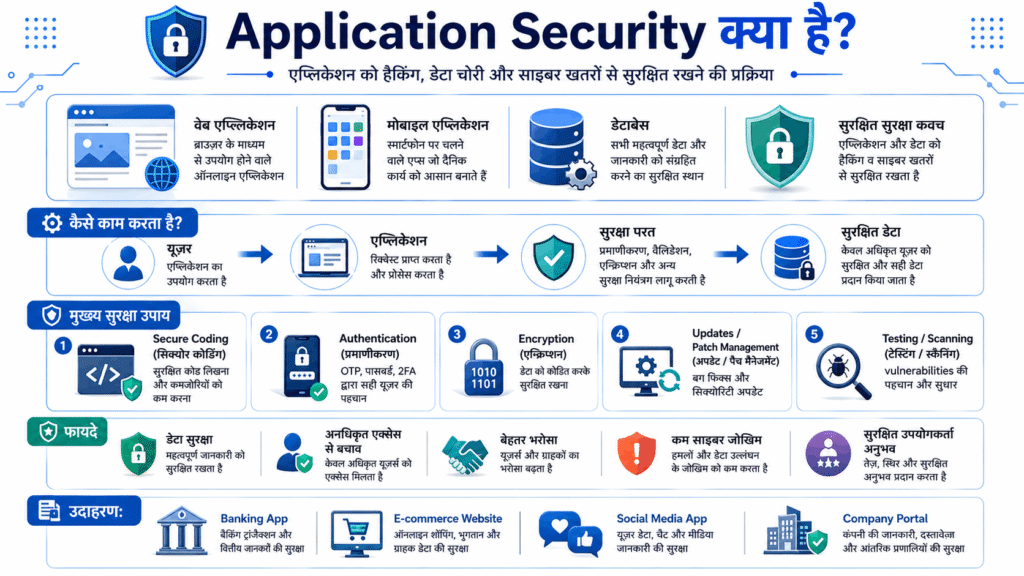
Application Security का मतलब है software, apps और websites को security threats से बचाना। आज हम हर काम के लिए apps use करते हैं—banking app, payment app, shopping app, social media app, learning app और business software। अगर कोई app secure नहीं है, तो hacker उसी app की कमजोरी का फायदा उठाकर user data चुरा सकता है। इसी वजह से application security बहुत जरूरी हो जाती है।
Application security mainly developers और companies के लिए important होती है, लेकिन users को भी इसकी basic understanding होनी चाहिए। जब कोई developer app बनाता है, तो उसे secure coding practices follow करनी चाहिए। अगर code में गलती या vulnerability रह गई, तो hacker SQL injection, cross-site scripting, malware injection या unauthorized login जैसे attacks कर सकता है। इसलिए apps को regular update करना जरूरी होता है, क्योंकि updates में सिर्फ नए features नहीं आते, बल्कि security patches भी होते हैं।
Application Security के Example
- Banking apps में OTP verification
- Password encryption
- App updates
- Bug fixing
- Secure login system
- Two-factor authentication
- Safe coding practices
उदाहरण के लिए, अगर आपके mobile में कोई old version app है और आप उसे update नहीं करते, तो उस app में security weakness रह सकती है। Hacker उसी weakness का फायदा उठा सकता है। इसलिए apps हमेशा official source से download करें, cracked software use न करें और unknown APK files install करने से बचें। Application security users और developers दोनों की जिम्मेदारी होती है।
3. Information Security क्या है?
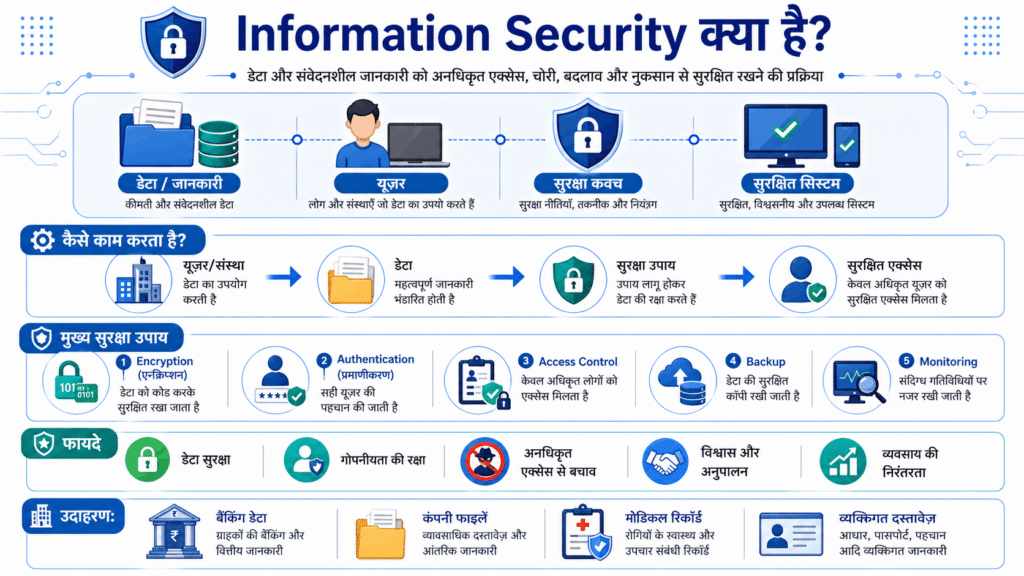
Information Security यानी data की सुरक्षा। Computer security में यह सबसे जरूरी parts में से एक है, क्योंकि आज data ही सबसे valuable asset है। आपका नाम, mobile number, email, password, bank details, documents, photos, business files और website login details—ये सब information हैं। अगर यह information गलत हाथों में चली जाए, तो बड़ा नुकसान हो सकता है।
Information security का काम यह ensure करना है कि data सिर्फ सही व्यक्ति को ही मिले, data में unauthorized बदलाव न हो और जरूरत पड़ने पर data available रहे। इसे cyber security में CIA Triad कहा जाता है—Confidentiality, Integrity और Availability। Confidentiality का मतलब data private रहे, Integrity का मतलब data सही और unchanged रहे, और Availability का मतलब जरूरत पड़ने पर data access हो सके। ये तीनों मिलकर information security की strong foundation बनाते हैं।
Information Security के Example
- Strong password
- Data encryption
- Two-factor authentication
- Data backup
- Access control
- Secure file sharing
- Password manager
आप इसे ऐसे समझिए—अगर आपका Gmail password किसी को पता चल जाए, तो वह आपके emails, documents, social media और कई linked accounts तक पहुंच सकता है। इसलिए strong password और 2FA बहुत जरूरी है। Important files का backup जरूर रखें, क्योंकि ransomware attack या system failure की स्थिति में backup ही आपका data बचा सकता है। Information security personal users, bloggers, businesses और students—सभी के लिए जरूरी है।
4. Endpoint Security क्या है?
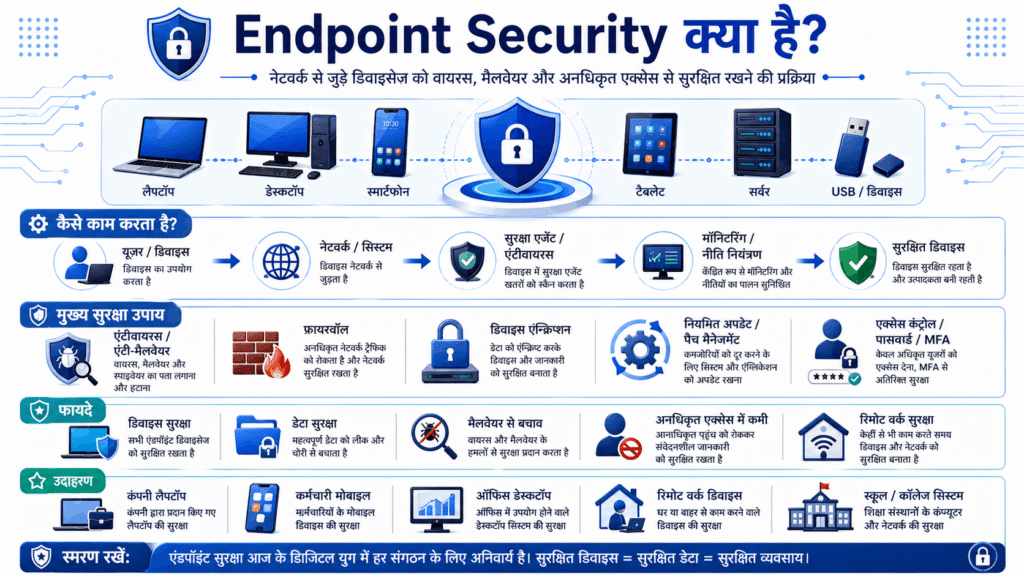
Endpoint Security उन devices की सुरक्षा करता है जो किसी network से जुड़े होते हैं। जैसे laptop, desktop, mobile, tablet, printer, server आदि। ये सभी endpoints कहलाते हैं। अगर इनमें से कोई भी device infected हो जाए, तो पूरा network risk में आ सकता है। यही कारण है कि endpoint security companies और individual users दोनों के लिए बहुत जरूरी है।
आज remote work, online classes, freelancing और digital business के कारण endpoint security का महत्व बहुत बढ़ गया है। बहुत से लोग अपने personal laptop या mobile से office work करते हैं। अगर उनके device में malware या virus है, तो company data भी खतरे में आ सकता है। Endpoint security antivirus, anti-malware, device encryption, screen lock, system updates और monitoring tools के जरिए device को protect करता है।
Endpoint Security के Example
- Antivirus software
- Anti-malware protection
- Device lock
- Operating system updates
- Mobile security
- USB scanning
- Endpoint Detection and Response tools
उदाहरण के लिए, अगर आप किसी unknown pen drive को अपने laptop में लगाते हैं और उसमें virus है, तो आपका पूरा system infected हो सकता है। इसी तरह pirated software install करने से malware आ सकता है। इसलिए trusted antivirus रखें, Windows या operating system update करें, unknown files download न करें और अपने laptop/mobile में lock जरूर लगाएं। Endpoint security आपकी पहली practical safety layer है।
5. Cloud Security क्या है?
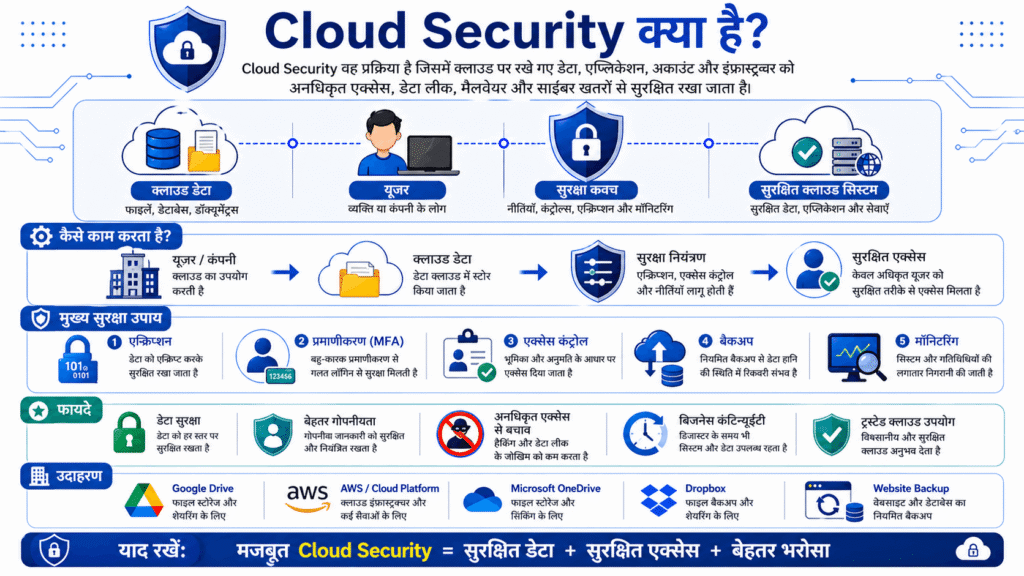
Cloud Security आज के समय में बहुत ज्यादा important हो गई है, क्योंकि अब data सिर्फ computer में नहीं, बल्कि cloud platforms पर भी store होता है। Google Drive, OneDrive, Dropbox, iCloud, AWS, Google Cloud और Microsoft Azure जैसे platforms cloud services provide करते हैं। अगर cloud account secure नहीं है, तो आपका data कहीं से भी access किया जा सकता है।
Cloud security का main purpose cloud में stored data, apps और services को unauthorized access, data breach और cyber attacks से protect करना है। इसमें encryption, identity access management, multi-factor authentication, backup, monitoring और permission control का इस्तेमाल होता है। बहुत बार users गलती से cloud files को public कर देते हैं या weak password रख देते हैं, जिससे data leak हो सकता है।
Cloud Security के Example
- Google Drive security
- AWS Identity and Access Management
- Cloud data encryption
- Backup and recovery
- Multi-factor authentication
- Permission control
- Secure file sharing
अगर आप blogger हैं और अपनी website backup cloud में रखते हैं, तो cloud security आपके लिए बहुत जरूरी है। अगर आपका cloud account hack हो गया, तो website backup, images, documents और login files खतरे में पड़ सकते हैं। इसलिए cloud storage में strong password, 2FA और सही sharing permissions का इस्तेमाल करें। किसी भी file को public करने से पहले check करें कि वह sensitive तो नहीं है।
📊 5 Types of Computer Security Comparison Table
| Security Type | किसे Protect करता है | Main Use | Example |
|---|---|---|---|
| Network Security | Internet और network connection | Unauthorized access रोकना | Firewall, VPN |
| Application Security | Apps और software | App vulnerabilities रोकना | Secure login, updates |
| Information Security | Data और files | Data चोरी रोकना | Encryption, backup |
| Endpoint Security | Devices | Virus और malware रोकना | Antivirus, device lock |
| Cloud Security | Cloud data और services | Cloud account/data secure करना | 2FA, cloud encryption |
5 Types of Computer Security में सबसे जरूरी कौन सा है?
सच कहा जाए तो इनमें से कोई एक security type अकेले काफी नहीं है। अगर आपका network secure है लेकिन आपका password weak है, तो hacker आपके account में घुस सकता है। अगर आपका data encrypted है लेकिन आपका laptop virus से infected है, तो information फिर भी risk में है। अगर आपका cloud account secure है लेकिन आप files public share कर देते हैं, तो data leak हो सकता है।
इसलिए best approach है multi-layer security। मतलब आपको network, application, information, endpoint और cloud security को साथ में use करना चाहिए। यही complete computer security system बनाता है। बड़े businesses भी इसी layered security model को follow करते हैं, क्योंकि cyber attacks अलग-अलग तरीकों से होते हैं और हर attack को रोकने के लिए अलग security layer जरूरी होती है।
Computer Security को Strong बनाने के Practical Tips
अगर आप beginner हैं, तो भी आप basic security habits follow करके अपने computer और data को काफी हद तक safe रख सकते हैं। सबसे पहले strong password बनाएं और हर account के लिए अलग password रखें। Password में नाम, mobile number या date of birth का इस्तेमाल न करें। जहाँ possible हो, वहाँ two-factor authentication जरूर enable करें।
अपने computer और mobile को regular update रखें, क्योंकि updates में security patches आते हैं। Antivirus install करें और unknown websites से software download न करें। Public Wi-Fi पर sensitive काम करने से बचें। Important data का backup रखें और cloud sharing permission को carefully manage करें। ये basic steps छोटे लगते हैं, लेकिन cyber security में इनका impact बहुत बड़ा होता है।
Conclusion
5 types of computer security को समझना हर digital user के लिए जरूरी है। Network security आपके internet connection को safe रखती है, application security apps को protect करती है, information security data को secure करती है, endpoint security devices को बचाती है और cloud security online stored data को सुरक्षित रखती है। ये पाँचों security types मिलकर एक complete protection system बनाते हैं।
आज cyber threats तेजी से बढ़ रहे हैं, इसलिए security को हल्के में लेना नुकसानदायक हो सकता है। चाहे आप student हों, blogger हों, business owner हों या normal internet user—computer security आपकी digital safety के लिए जरूरी है। अगर आप इन security types को सही तरीके से समझकर basic precautions follow करते हैं, तो आप अपने system, data और privacy को काफी हद तक सुरक्षित रख सकते हैं।
❓ FAQs
Q1: Computer security क्या है?
यह आपके system और data को protect करने की प्रक्रिया है।
Q2: सबसे important security कौन सी है?
Information security और network security सबसे जरूरी हैं।
Q3: क्या antivirus जरूरी है?
हाँ, यह basic security के लिए जरूरी है।
Q4: Cloud security क्यों जरूरी है?
क्योंकि आज data cloud में store होता है।
Q5: क्या free security tools safe हैं?
कुछ basic protection देते हैं, लेकिन paid tools ज्यादा secure होते हैं।
[…] 5 Types of Computer Security: पूरी जानकारी आसान भाषा में […]
[…] 5 Types of Computer Security: पूरी जानकारी आसान भाषा में […]