
Free AI Voice Generator Realistic: Top 5 Tools for Realistic Audio
A Free AI voice generator realistic enough for YouTube, podcasts, faceless videos, tutorials, reels, and explainer content can save hours. But the wrong voice can make even a strong script sound cheap.
I tested these tools like a creator, not like a software brochure. I checked realism, pauses, emotional delivery, free limits, export/download practicality, and whether the tool makes sense for YouTube content.
Some tools sound amazing but run out of credits quickly. Some give more free usage but need careful editing. Some are great for Shorts, while others are better for long-form narration.
How I Tested These Free AI Voice Generators
I used the same short script style across the tools so the comparison stayed fair. I was not only listening for “nice voice.” I was listening for creator usefulness.
My test script included three common creator lines:
- “Today I’ll explain five free AI voice tools for realistic audio.”
- “This one mistake can make your whole video feel fake.”
- “Most viewers decide in the first five seconds.”
A weak AI voice reads all three lines with the same rhythm. A better voice changes pace and tone. A strong voice adds small human-like timing differences that make the narration easier to listen to.
My Realism Scoring Criteria
This is not a lab test with studio meters. It is a creator-focused quality check. I wanted to know which tools are useful for real publishing workflows.
If I had to choose one tool for emotional realism, I would start with ElevenLabs. If I had to create a full YouTube video with voiceover, captions, and export in one place, I would use Clipchamp.
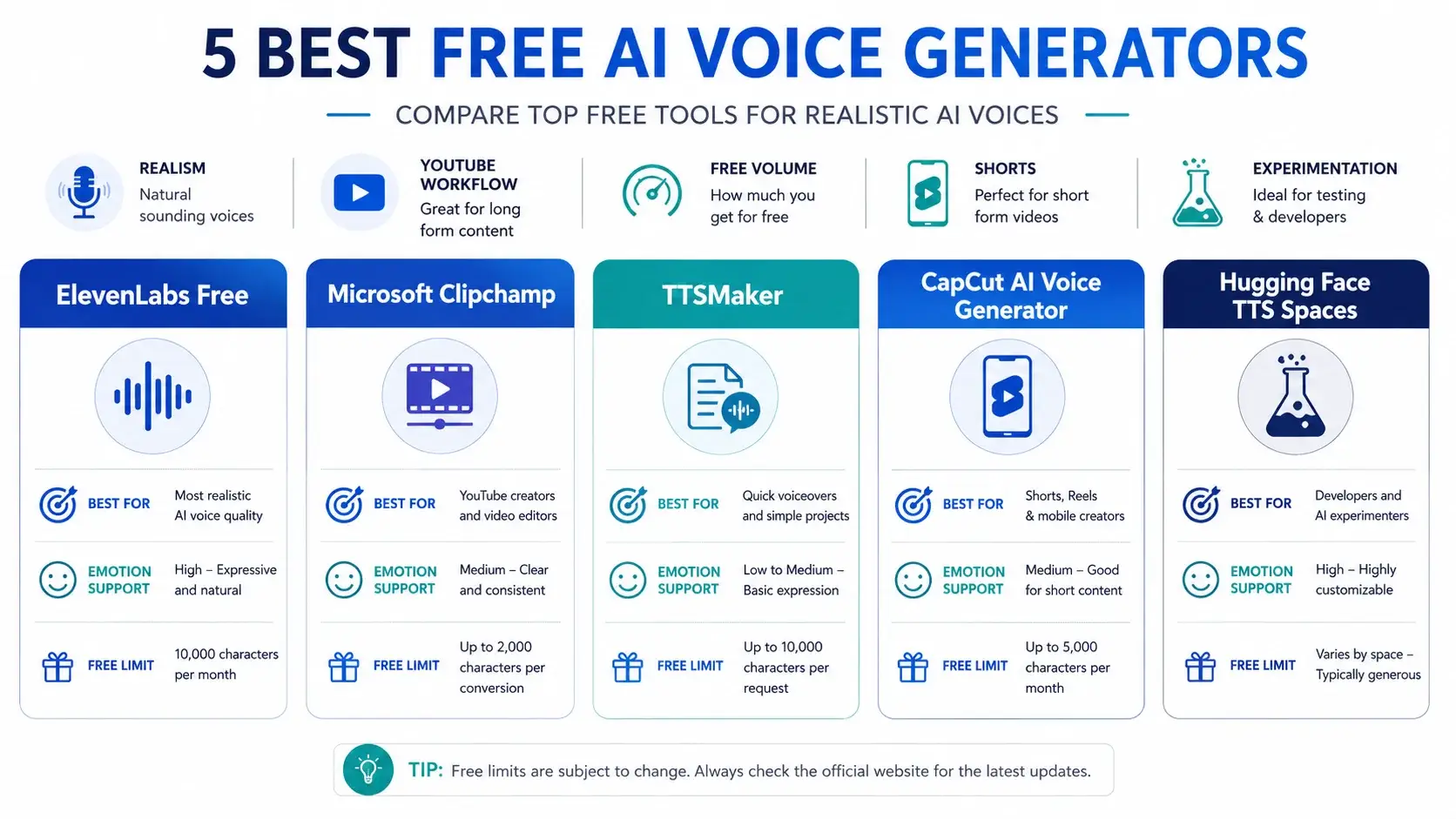
At a Glance: The Realistic Voice Matrix
Use this quick matrix to compare each tool before reading the deep dive. It focuses on realistic audio, creator workflow, emotion support, and true free limits.
| Tool Name | Best For | Emotion Support | True Free Limit |
|---|---|---|---|
| ElevenLabs Free | Realistic narration, emotional testing, premium-style voice demos | Yes | 10k credits/month; commercial license starts on Starter plan |
| Microsoft Clipchamp | YouTube videos, tutorials, explainers, editing workflow | Yes / Partial | Free voiceovers, AI subtitles, 1080p exports, no watermark |
| TTSMaker | Longer free narration, simple MP3 downloads, volume users | Partial | 20,000 characters/week; 500 characters per conversion |
| CapCut AI Voice Generator | Shorts, Reels, TikTok-style edits, fast social videos | Yes | Free online AI voice tool; exact limits may vary by account and region |
| Hugging Face TTS Spaces | Open-model testing, experiments, technical creators | Model-dependent | Free public demos, but runtime, queue, and license limits vary |
Deep Dive: Top 5 Free AI Voice Generators
Now let’s break down the tools one by one. The goal is not to find a fake “unlimited” tool. The goal is to choose the right free AI voice workflow for your actual content.
1. ElevenLabs Free
If I need the most realistic free AI voice for a serious test, ElevenLabs is the first tool I check. It handles emotion better than most beginner tools and can sound softer on a serious line, sharper on a hook, and more natural when a sentence needs space.
A basic text-to-speech tool reads words. ElevenLabs tries to perform them. That is why many creators compare every ElevenLabs free alternative against ElevenLabs first.
Credit math: ElevenLabs officially lists a Free plan with 10k credits per month. Its Starter plan includes a commercial license, so the Free plan is better treated as testing and experimentation if you are planning paid or monetized use. Check ElevenLabs pricing.
A 1,000-word English script can easily become around 5,500 to 6,500 characters including spaces and punctuation. So one long script can use a large part of the free allowance.
Best for: emotional hooks, short narration, voice testing, premium-style samples, and realistic script demos.
- Very realistic voice quality
- Strong emotional delivery
- Natural pacing
- Free credits run out quickly
- Commercial license is listed under Starter, not Free
My verdict: If you need a free AI voice generator, realistic emotional delivery is where ElevenLabs wins. It is best for testing emotional narration before you build a full creator workflow.
2. Microsoft Clipchamp
Clipchamp is not just a voice generator. That is why I like it for beginner creators. Many AI voice tools give you an audio file and stop there. Clipchamp keeps the voiceover inside the video editing workflow.
That makes it one of the best options for creators looking for the Best AI voice generator for YouTube workflow, not just a standalone voice clip.
Clipchamp’s official pricing page says the free plan includes basic editing tools, AI subtitles, voiceovers, silence removal, and exports up to 1080p with no watermarks. Check Clipchamp pricing.
Core feature: voiceover plus editing in one place. You can write a section, generate voiceover, place it on the timeline, add subtitles, cut visuals around the voice, remove silence, and export.
Credit math: Clipchamp does not give one simple universal text-to-speech character limit for every language and voice combination on the pricing page. The safest method is script chunking.
- Strong YouTube workflow
- AI voiceovers included in free plan
- Free 1080p exports with no watermark
- AI subtitles and silence removal included
- Not always as emotionally rich as ElevenLabs
My verdict: Clipchamp is the best YouTube workflow pick. If your goal is publishing videos, not just testing voices, Clipchamp is one of the safest free places to start.
3. TTSMaker
TTSMaker is not the flashiest tool here, but it solves a real creator problem: free character volume. A lot of AI voice tools look great until you check the limit.
Its official pricing page lists a Free plan with 20,000 characters per week, 500 characters maximum per conversion, unlimited downloads with 30 minutes of conversion history, 600+ AI voices, 100+ languages, captcha and ads, and up to 50 pause insertions. Check TTSMaker pricing.
Credit math: If one minute of English narration uses around 750–900 characters, then 20,000 characters can roughly support 22–26 minutes of narration per week.
The catch is the 500-character per conversion limit. That means a 2,500-word article may need roughly 25–35 separate voice blocks depending on sentence length and punctuation.
Free text to speech emotional workflow: TTSMaker’s free plan does not support multi-emotional settings, but pause insertion can make narration feel more natural when used carefully.
- 20,000 free characters per week
- Unlimited downloads listed on free plan
- Many voices and languages
- 500-character per conversion limit
- Multi-emotional settings not supported on free plan
My verdict: TTSMaker is the best free-volume tool in this list. It is not always the most emotional, but it is useful when you need more free narration time.
4. CapCut AI Voice Generator
CapCut is built for fast content. If you make YouTube Shorts, Instagram Reels, TikTok-style videos, quick facts, motivational edits, or caption-heavy explainers, CapCut fits that workflow naturally.
CapCut’s official AI voice generator page describes a free online AI voice generator that creates human-like voice output, supports accents and languages, and allows customization such as speed, pitch, volume, and voice quality. Check CapCut AI voice generator.
Core feature: short-form speed. CapCut works best when voice is part of a fast visual edit with subtitles, motion, music, and timing.
Free limit caution: CapCut promotes the AI voice generator as free online, but exact practical limits can vary by account, region, app version, and feature access. I would not call it unlimited.
- Fast short-form workflow
- Good for Shorts and Reels
- Natural-sounding voice options
- Speed, pitch, and volume customization
- Exact free limits may vary
5. Hugging Face TTS Spaces
Hugging Face is not one polished AI voice product. It is a platform where developers, researchers, and creators share models and demos. Some Spaces let you test text-to-speech models directly in the browser.
This is useful for advanced users, but it can confuse beginners. Public demos may have queues, runtime limits, hardware limits, downtime, or model-specific restrictions. Check Bark Space.
Core feature: experimentation. Hugging Face is best for technical creators who want to test open models, multilingual options, and experimental speech outputs.
Credit math: There is no universal free credit limit for all Hugging Face TTS Spaces. Every Space is different. Always check the model license before commercial use.
- Great for testing open models
- Useful for technical creators
- Many experimental TTS options
- Not beginner-friendly
- Commercial rights require license checking
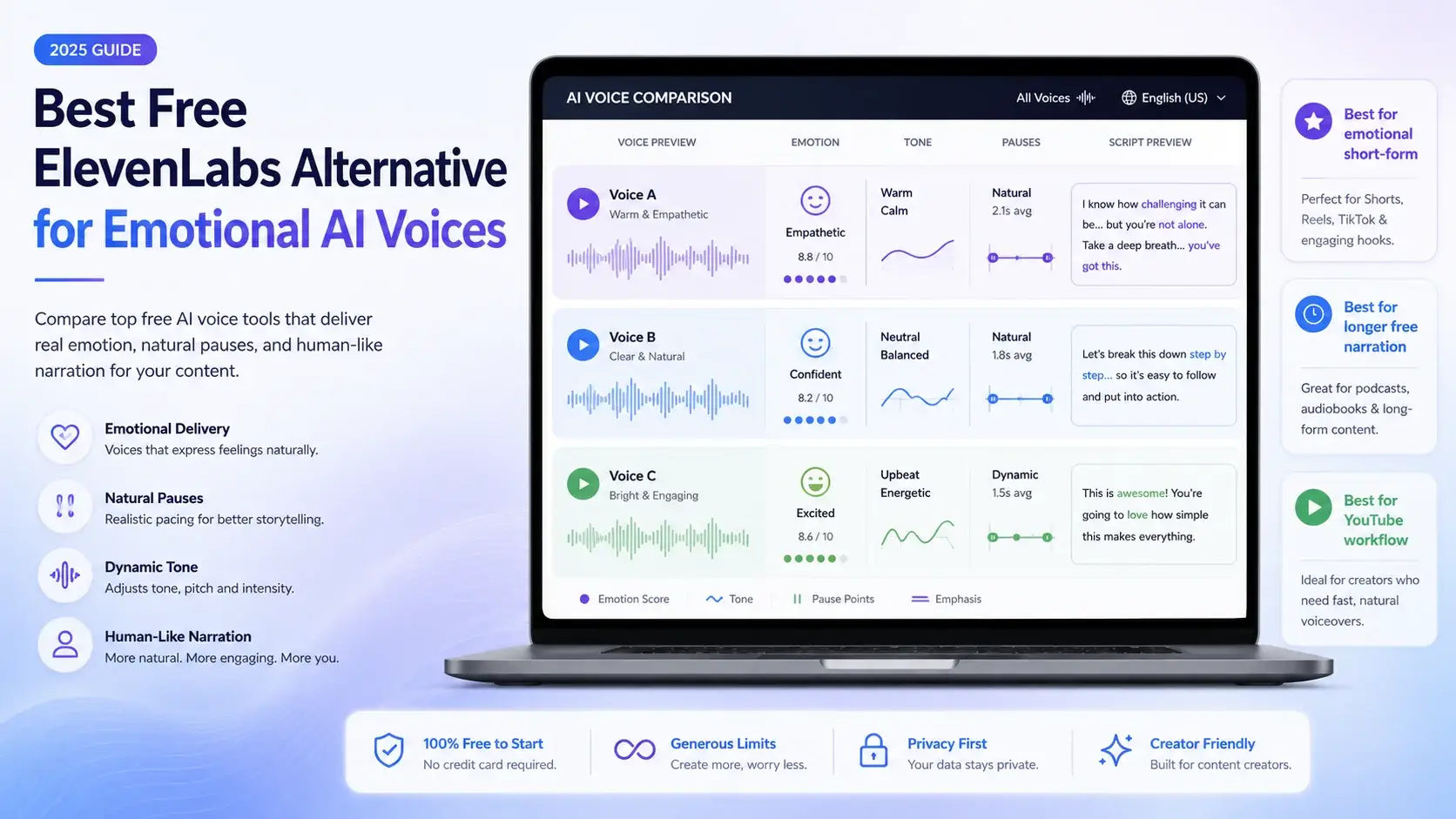
The Best Free ElevenLabs Alternative for Emotional Voices
ElevenLabs is the quality benchmark because it handles natural pacing, tone, and emotion better than most beginner tools. But the free plan is limited, and commercial license appears under Starter on the official pricing page.
So what is the best ElevenLabs free alternative? My honest answer depends on your goal.
For emotional short-form content, try CapCut. For longer free narration, use TTSMaker. For YouTube editing workflow, use Clipchamp. For open-model experiments, test Hugging Face Spaces.
There is no single perfect free replacement for ElevenLabs. The best alternative depends on whether you need emotion, free volume, video editing, or model experimentation.
To make any AI voice sound more human, stop writing giant paragraphs. Break scripts into smaller voice blocks, use punctuation like audio direction, regenerate only weak lines, and edit silence manually.
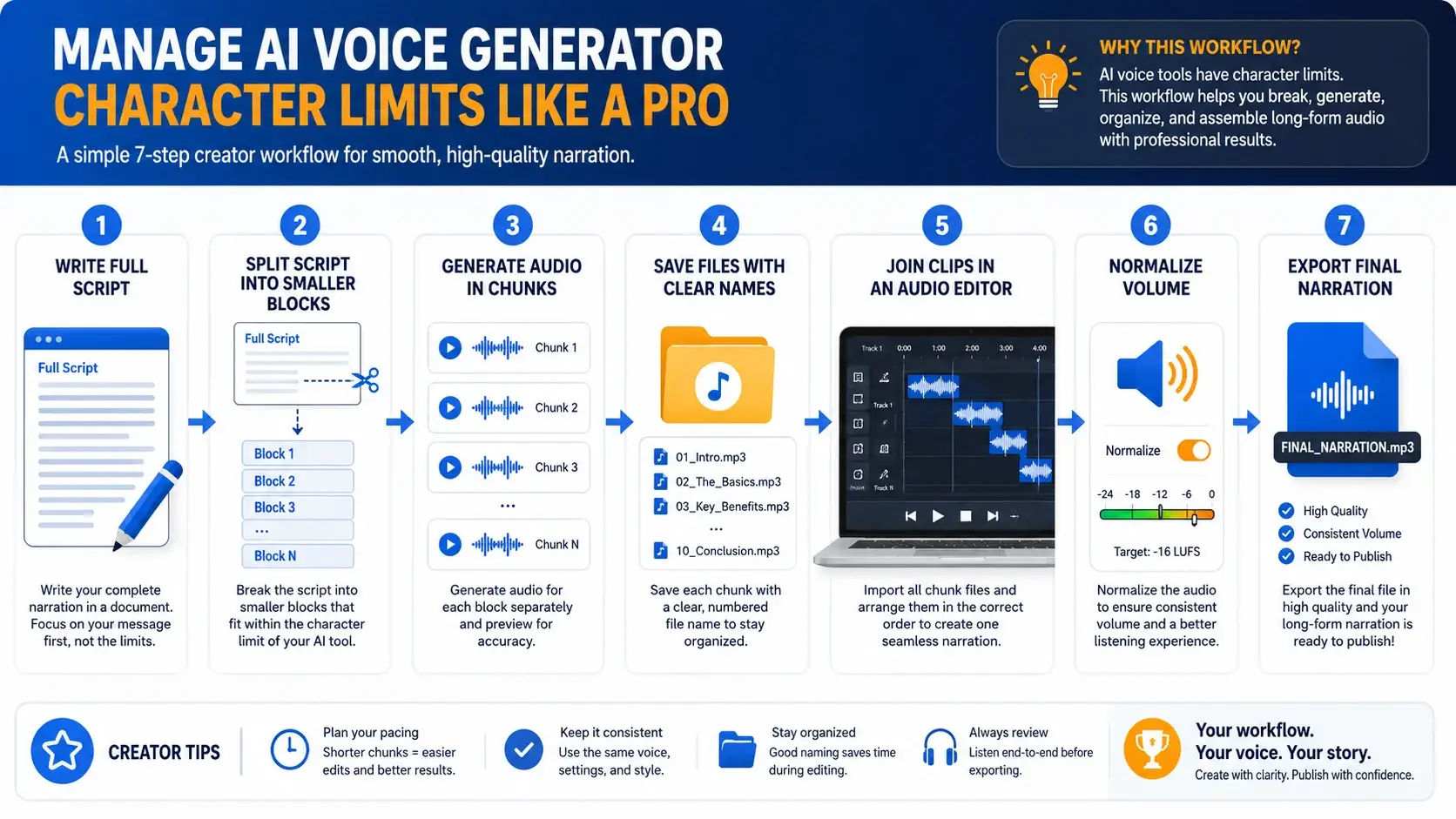
Advanced Creator Workflow: Split Long Scripts Without Breaking Free Limits
Some people call this a character-limit hack. I prefer calling it script splitting. It is not about abusing free tools or creating fake accounts. It is about working inside the tool’s real limits in a clean way.
Many free AI voice generators limit characters per conversion. TTSMaker lists 500 characters per conversion on its free plan, so splitting long scripts is practical.
Can You Use These Free AI Voices Commercially?
Do not assume that “free to generate” always means “free for commercial use.” This is one of the most important checks before YouTube monetization, client work, paid courses, ads, or brand content.
- ElevenLabs Free: useful for testing, but official pricing lists commercial license under Starter. Check pricing.
- Clipchamp: strong free creator workflow, but check asset, music, stock, and usage rules before commercial publishing. Check Clipchamp.
- TTSMaker: strong free character limits, downloads, and pause insertions, but always check current license terms directly. Check TTSMaker.
- CapCut: verify exact account, region, export, and commercial conditions before monetized use. Check CapCut.
- Hugging Face: always check each model license because rights can differ from model to model.
My simple rule: if the video is for a client, ad, brand channel, paid course, or monetized business use, check the license before publishing.
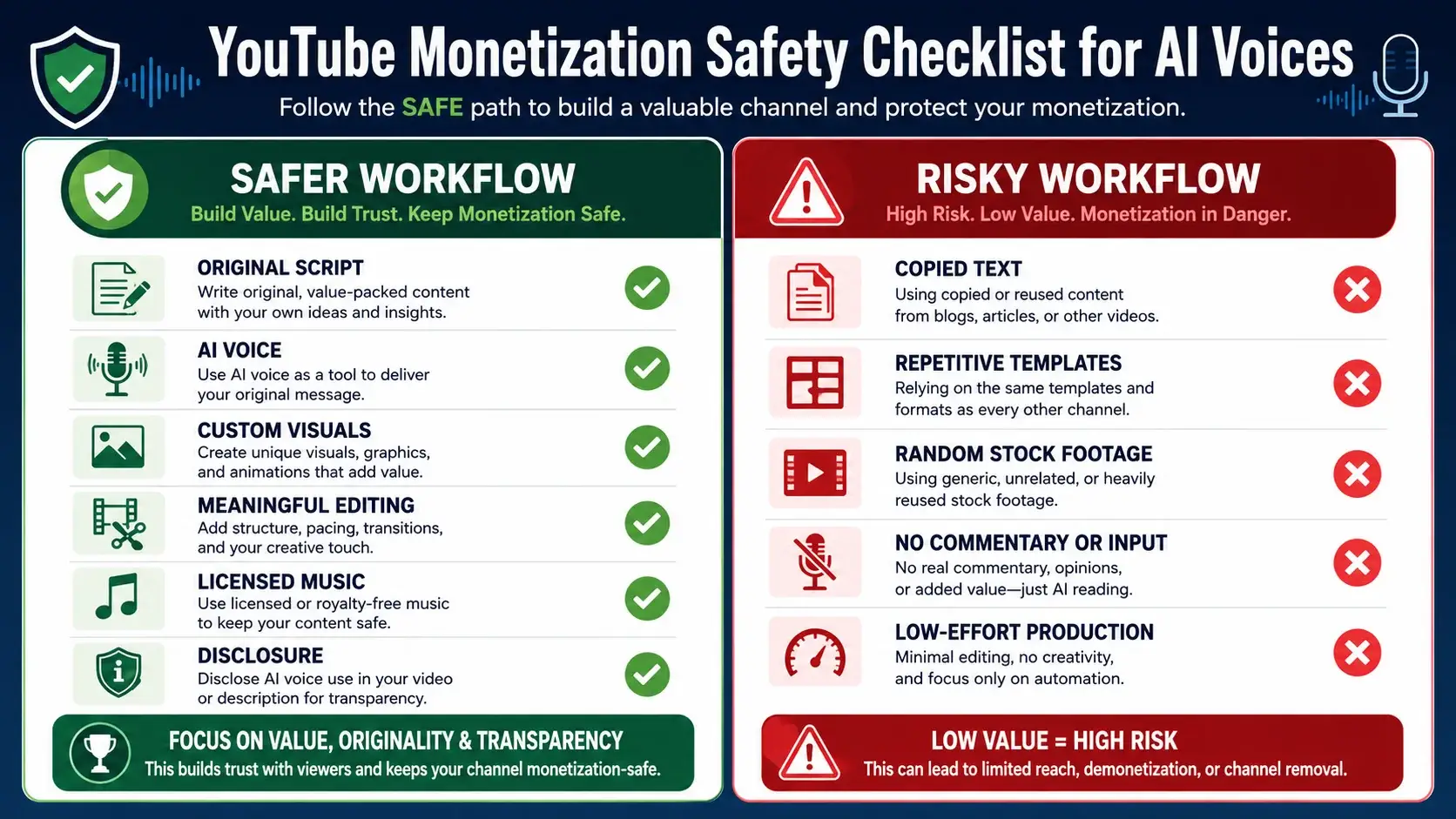
Are Free AI Voices Safe for YouTube Monetization?
Yes, free AI voices can be safe for YouTube monetization, but the voice alone does not decide monetization. YouTube looks at the full content experience.
If you use an AI voice over copied text, copied visuals, stock footage, and repeated templates with almost no original value, the problem is not only the AI voice. The problem is weak originality.
YouTube requires creators to disclose meaningfully altered or synthetically generated content when it seems realistic, including content created or altered using audio, video, or image tools. Read YouTube AI disclosure guidance.
For monetization, YouTube’s channel monetization rules focus on original and authentic content, and repeated or reused content with little transformation can create issues. Read YouTube monetization policy.
Creator-safe checklist
- Write your own script.
- Add original examples, commentary, or analysis.
- Do not clone someone else’s voice without permission.
- Check commercial-use rights.
- Avoid mass-producing the same format with tiny changes.
- Use licensed music and visuals.
- Disclose realistic altered or synthetic content when YouTube requires it.
- Keep proof of your script, edits, and workflow.
Which Free AI Voice Generator Should You Choose?
Choose based on your use case, not hype. A YouTube educator needs clean narration and editing control. A Shorts creator needs speed. A podcast-style creator needs natural pacing. A technical creator may want open models.
For most beginners, my practical workflow would be: use ElevenLabs to test premium-style voice quality, use TTSMaker for longer draft narration, use Clipchamp or CapCut for editing and publishing, and use Audacity to join and clean audio clips.
Pro Tip: Use InfoJustify Resources While Building Your Creator Workflow
While you are building your YouTube workflow, do not forget your website’s presentation. I use the HTML Visual Editor right here on InfoJustify to design responsive comparison tables, tool boxes, and Custom HTML sections like the one above.
You can also browse our Artificial Intellgent tag for more creator hacks, AI tool guides, and deep-dive tutorials.
Trust & Website Reference
InfoJustify focuses on simple, useful, and reader-friendly information. For website transparency, readers can also check the Privacy Policy page.
Final Verdict: Best Free AI Voice Generator Realistic Enough for Creators
If you want the most realistic emotional voice, start with ElevenLabs Free. If you want the best free YouTube workflow, use Clipchamp. If you need the most practical free character volume, test TTSMaker.
The best realistic free AI voice generator for your work depends on what you are creating. Do not chase one “perfect free AI voice generator.” Build a workflow.
Use the best tool for each step. Test the voice. Split the script. Edit the pauses. Normalize the audio. Add original value. Check commercial rights. Follow YouTube disclosure rules when required.
Frequently Asked Questions
1. What is the most realistic AI text-to-speech for free?
ElevenLabs Free is the most realistic free option for emotional voice testing, but credits are limited. For longer free narration, TTSMaker is more practical, though less emotionally advanced.
2. Can I use AI voices for commercial purposes?
Sometimes. It depends on the tool and plan. ElevenLabs lists commercial license under Starter. Other tools may vary, so always check current license terms before monetized, client, or paid use.
3. Does CapCut have realistic AI voices?
Yes. CapCut offers a free online AI voice generator with human-like voices, multiple accents and languages, plus speed, pitch, volume, and voice-quality controls.
4. How do I make AI voices sound more emotional?
Split the script into short blocks, use punctuation, add pauses, choose a matching voice style, slow down serious lines, and edit silence manually in a free audio editor.
- Are AI voices safe for YouTube monetization
- Realistic Indian Accent AI Voices for Free: 3 Best Tools
- ElevenLabs Free Alternatives for Emotional Voices: 3 Picks
- Best Free AI Voice Generators for Faceless YouTube Shorts
- Top 5 Free AI Voice Generator Realistic Tools
- Free AI Video Generators Without Watermark: 2026 Truth
- AI vs Machine Learning: Powerful 2026 Career Truth
- Generative AI Uses and Risks: 11 Real-Life Lessons for Beginners
- What is Generative AI? 12 Powerful Basics for Beginners
- What is AI? 11 Powerful Basics Every Beginner Should Know
4 thoughts on “Top 5 Free AI Voice Generator Realistic Tools”